

Spotted by
Sophie Bennett
Deal Hunter & Savings Expert · posted Jan 27
BISS
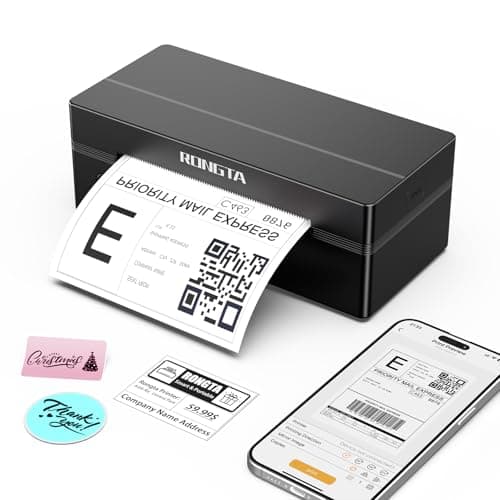
Rongta Bluetooth Thermal Shipping Label Printer, Wireless 4x6 Label Printer for Shipping Packages&Small Business, Compatible Windows/Mac/Android/iOS, Support USPS, UPS, Ebay, Etsy, Shopify, RP425
Rongta
Phone/Tablet Start Print: Step 1: Download APP "RLabel" in google play or ios app store; Step 2: Turn on the RP425 label printer and make a Bluetooth connection in the APP; Step 3: Click the "+" sign to complete the device connection and select the file type to start print PC Start Print: Step 1:Please download and install the RP425 driver from the Instruction Card; Step 2: Connect with bluetooth or USB cable with your computer; Step 3: Select and open your document, and choose RP4xx in the printer list (For Chrome OS: Achieve seamless Bluetooth pairing through the matching extension) High-Speed and Easy Set: Easy setup.
The package includes Rongta RP425 Printer, User Manual, Instruction Card, Type-C Adapter, you can set up as needed.
Print up to 60 labels per minute (127mm/s).
Direct thermal technology, no ink or other consumables needed.
Easy set and print via "RLabel" app Automatic Label Detection: Rongta RP425 printer can automatically catch and feed the label and supports label width range from 0.
98" to 4.
37", it is good for printing shipping and warehouse labels, also suitable for own business Compatibility: Rongta RP425 printer support IOS/Android phone&tablet.
Works with WINXP/WIN7/WIN8/WIN10/WIN11/MAC/Chrome.
Compatible with all major shipping and e-commerce platforms inlcuding FedEx, DHL, Amazon, Etsy, eBay, Shopify, etc Small Size&Portable: RP425 label printer has small size (3.
26*2.
56*7.
08 inch), weight only 1.
25lb, portable design is easy to move and save desk space.
Multi Device Connectivity: Rongta RP425 printer can be connected to both computer and mobile phone simultaneously(most 3 device meanwhile).
Note: RP425 printer does not support the operation of triggering the print content simultaneously on a computer and a mobile phone, as this would cause data conflicts and confusion.
But if they are not printed simultaneously, it won't affect.
Affiliate Disclosure: As an Amazon Associate I earn from qualifying purchases. Prices and availability are subject to change.
The Highlights
- Phone/Tablet Start Print: Step 1: Download APP "RLabel" in google play or ios app store; Step 2: Turn on the RP425 label printer and make a Bluetooth connection in the APP; Step 3: Click the "+" sign to complete the device connection and select the file type to start print
- PC Start Print: Step 1:Please download and install the RP425 driver from the Instruction Card; Step 2: Connect with bluetooth or USB cable with your computer; Step 3: Select and open your document, and choose RP4xx in the printer list (For Chrome OS: Achieve seamless Bluetooth pairing through the matching extension)
- High-Speed and Easy Set: Easy setup. The package includes Rongta RP425 Printer, User Manual, Instruction Card, Type-C Adapter, you can set up as needed. Print up to 60 labels per minute (127mm/s). Direct thermal technology, no ink or other consumables needed. Easy set and print via "RLabel" app
Product ID: B0FRMC55L5
Listed: January 27, 2026